

Visual CD - Free CD catalog software
Imagine this kind of situation: every few months, you transfer seldom used files onto digital media by burning them into CDs or DVDs. A year later, you need to recover one of the files from a pile of unmanaged CD collections. Can you find it quickly?
The normal way to solve this problem is to insert all of them one by one and try to search for the files. You may argue that you can solve this by carefully labeling your CDs but I bet that you can’t write all of the file names on its surface. A good way to proactively handle this hassle is to use digital catalog software such as Visual CD; where you can download and use free of charge.
Visual CD is a digital cataloging software that allows you to index all of your digital files. I find it most useful for cataloging removable medias such as CDROM and DVD ROM. How Visual CD works is pretty easy. Each time after you burn a media, open Visual CD to read the media and index its contents. You can also add comments or labels to your media that reflects its contents.
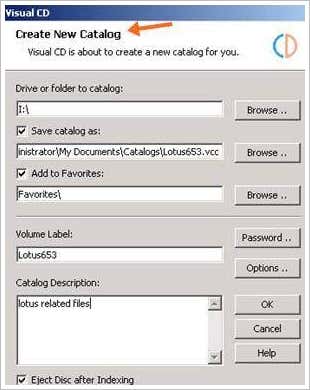
When the need arise in the future, you can search all your digital collection without having to insert/connect them physically to your computer; thus speeding the search for a particular file.
Visual CD Features
- Easy to use with Explorer like interface that gets you started in no time.
- Catalog media from various sources - CD, DVD, HD-DVD, BlueRay disc, USB thumb drive, hard drive and even folders.

- Advanced Search - quickly search for a file from one of multiple catalogs using various of options and filters without the need to insert your media.

- Option to index the dimension and duration information from video and music files.
- Option to extract and store thumbnails of digital images, icon, video and executable files.

- Able to index files inside compressed files; support for 7Zip, RAR, CAB and ZIP file format.
- Support MP3 music file ID3v1 and ID3v2 tags.
- Password protect catalog to prevent unauthorized access to private file information.
- Flexible - easily move, copy, delete, migrate and rename catalogs.
- Favorites Manager allows you to find your frequently used media quickly from the interface.
- Verify and update catalogs easily - useful if you are adding new files to a multisession disc.
- Save directory structure to a text file.
- Export / batch export your catalog to HTML, XLS, RTF or text format.

- Comes with loads of useful extra tools - MP3 playlist generator, Advanced Rename tool, Duplicate File Finder, File Splitter, NFO Reader, Photo Rename tool and Thumbnail Maker.


0 Response to "Visual CD - Free CD catalog software"
Post a Comment