Convert an Ebook to Audio Book

Now in this Electronic going world, people are shifting towards E-books and Audio books, as they are portable and available Free on site such as Project Gutenberg. Recently , I was reading some E-book and found that it will effect my I eyes, as I was watching it on my PC. So, I thought of a way to convert an E-book to Audio book and Googled it out.
I found that a small utility "TextAloud" from NextUp will do my work, it is used to convert an eBook to an Audio Book and that can be put into mobile or a player and listened any where, the most portable way..

Read Users' Comments (0)

Get Windows 7 in you Windows XP

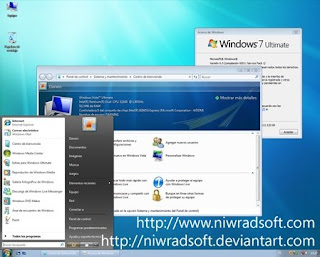
After monotony of default Windows XP/ Windows Theme, it is the time to change yourself and try something new. After windows 7 beta has been released, its time to try the latest Windows Looks and Feels. So just grab the latest Windows 7 Theme (Transformation Pack) which will give a fresh look to your computer.

Seven Remix is a completely free transformation pack which lets you enjoy the look and feel of windows 7 very easily. Seven Remix transformation pack is designed by niwradsoft
Seven Remix transformation pack is made to work on following versions of windows vista, Windows Vista (all editions, SP1), Windows 2008 (all editions, SP1), All Language Versions
Note: This transformation pack is not supported on 64-bit versions of Windows Vista or Windows XP.
Link:- Download Seven Remix Transformation Pack For Windows Vista

Read Users' Comments (0)

React OS – Alternative to Windows

I am using windows operating system for last decade and also sometime install Linux based distributions for testing purposes, this time I’ve found something really amazing to test operating system on my PC, and this amazing thing is React OS. It is Windows NT based open-source operating system, which supports Windows binary (exe) to run in it.reactos_cdcover

React OS is still under heavy development and is in alpha stage of development. The developers itself recommend not to use for daily purposes, till some more improvements are made; but if you are a computer geek and love to try out different OS, then you may give it a try. You can download React OS by various means-

  • Download React OS as Installation CD, Live CD
  • You can also run it virtualized using VMware virtual machine or QMenu
  • You can also get the source code of React OS

You can get to downloads page of React OS at here.

Read Users' Comments (0)

offline browser-HT Track

HTTrack is a free (GPL, libre/free software) and easy-to-use offline browser utility.

It allows you to download a World Wide Web site from the Internet to a local directory, building recursively all directories, getting HTML, images, and other files from the server to your computer. HTTrack arranges the original site's relative link-structure. Simply open a page of the "mirrored" website in your browser, and you can browse the site from link to link, as if you were viewing it online. HTTrack can also update an existing mirrored site, and resume interrupted downloads. HTTrack is fully configurable, and has an integrated help system.

WinHTTrack is the Windows 9x/XP/Vista release of HTTrack, and WebHTTrack the Linux/Unix/BSD release. See thedownload page.Screenshot of Windows GUI

Read Users' Comments (0)

Automatic lyrics display for your favorite track!


MiniLyrics is a fascinating lyrics viewer for synchronizing and displaying lyrics of the currently playing song in Winamp 2.0/3.0, Winamp 5.x, Windows Media Player, itunes, matchbox, Quintessenial Player, foobar2000. RealOne Minilyrics makes your music come alive with streaming lyrics that are timed with the song.

You can follow along with the artist and catch every word,and even sing along like a Karaoke machine. Minilyrics is an application that helps you to view lyrics of your favorite songs. Minilyrics is fully compatible with all major music players, like Winamp, Windows Media Player, etc. As the easiest-to-use Lyrics viewer software, Minilyrics only needs a few steps to install and take you less than 5 mins to have a full version ready for use. Whenever you launch the any of the media players, the software will automatically get started. Minilyrics lets you select your favorite skins, fonts, colors and minimize the viewer window to whatever size that you feel comfortable with. The karaoke mode brings you tremendous joy in learning a song by moving the lyrics word by word.

Some key features:
- Automatic lyrics display for your favorite songs
- Never expired trial version
- Cool skins
- Wild compatibility for 13 players

MiniLyrics supports:
· Winamp
· Windows Media Player
· Foobar2000
· Apple iTunes
· RealPlayer
· Quintessential Player
· Musicmatch Jukebox
· MediaMonkey
· The KMPlayer
· JetAudio
· Yahoo! Music Engine
· J. River Media Center
· J. River Media Jukebox
· XMPlay
· BSPlayer

MiniLyrics 6.6.320
New: Support VLC media Player 1.0.
New: New local hotkey settings.
Improved: Optimized the lyrics display CPU cost.
Improved: Lyrics editor.
Fixed: Lyrics displaying fade out bug.

Skins:http://www.crintsoft.com/mlskin.htm
Changes:http://www.crintsoft.com/mlwhatsnew.htm;http://www.minilyrics.com/msg.htm
Home:http://www.crintsoft.com/;http://www.minilyrics.com/

Official Download:
http://www.crintsoft.com/download/MiniLyrics.exe


Read Users' Comments (0)

Prevent Cut – Copy – Paste – Delete – Renaming of Files and Folders


If you don’t want others to use your computer, copy data and modify your files and folders, Try Prevent. It is a freeware app which prevents others from copying anything from your computer along with blocking access to cut, copy, paste, rename or delete files and folders.

You can download and install Prevent. You can use your own keyboard shortcuts to stop the application. If you want to activate Prevent, Just start the application and it prevents any unauthorized modifications. You can stop this application to get all the functions to work normally.


Here is the list of functions Prevent can be used for,

  • Prevent Cut – Copy – Paste – Delete – Renaming of Files and Folders

    Stops Cut

  • Stops Paste

  • Stops Copy

  • Stops Delete

  • Stops Copy To

  • Stops Move to

  • Stops Send To

  • Prevents renaming

  • Disables Task Manager’s End Process button.

  • It even prevents you to right click on process name and click on end process. It also grays out the context menu items, disable Ctrl+C, Ctrl+X and Ctrl+V and/or stops the process.

Get this handy application from this link.

Read Users' Comments (0)

Flash Cookies? What are Flash Cookies?

Flash cookies are a new way of tracing your movement and storing a lot more information about you than with normal cookies. One major disadvantage of flash cookies is that you can’t locate them in your browser. They are not shown in the list of cookies that you can see when you take a look at the cookies that are currently saved in your web browser. Normal HTTP cookies can’t save more than 4 Kilobyte of data while Flash cookies can save up to 100 Kilobyte. If you want to try out how they work you could do the following.

Go to Youtube, increase or decrease the volume of the videos and delete all cookies afterwards. You will notice that the volume level is still at the same level when you close your browser and open it again. This is done with so called Local Shared Objects, better known as Flash cookies. The main question is of course how a computer can be checked for Flash cookies and how it would be possible to delete those cookies again.

Turns out that web site operators can use Flash applets embedded on their site to write information into a preference file stored on the computer that visits the site. One thing this preference file can be used for is recreating a browser cookie that may have been deleted, or to store other tracking information. The idea of using Flash as a means of hiding a tracking cookie on a machine bothers me because it is insidious. There are clear interfaces built into web browsers for managing regular cookies, and users can delete or reject them as they choose. Flash Cookies are hidden in user libraries and preference files, and to manage them you have to burrow into Adobe’s support site to find the applet that will manage the privacy settings for the Flash Player installed on your computer. Did you catch that? To manage the privacy settings of a program installed on your computer, you have to go to an external web site. That bothers me on a fundamental level. I should be able manage the software on my computer using tools on my computer, without having to go to a vendor’s web site.


Because Flash Cookies use preferences written elsewhere on the computer, they aren’t tied to a single browser. I visited the Adobe page containing my Flash privacy settings with 2 different browsers and saw the same list of sites that are storing information on my machine. So, in that way, Flash Cookies are even better than regular browser cookies for advertising use, because they can affect every browser you have installed. A Flash Cookie could identify you to an advertiser, even if you’ve never visited the site with this specific browser before!

go to settings manager  
                                           to change settings 

Read Users' Comments (0)