Online death

This column is not about how you can remove your online persona. That, honestly, is extremely difficult. You need an e-mail account much like you need roti, kapda aur makaan and increasingly you need to be on a social network of some sort or another, which is usually Facebook. But just like going online is a certainty of life in the modern age, a much older certainty of life trumps that. Death. So, what happens to the online life of a family member or a friend you have lost to the Grim Reaper?
Well, the "Terms of Service"(TOS) for most online services are quite clear: An account is non-transferable and there is no "right" of survivorship. That is to say that the legal heirs of a deceased individual have no "rights" to the deceased person's account and its contents. Yahoo!'s TOS clearly states. "Upon receipt of a copy of a death certificate, your account may be terminated and all contents therein permanently deleted."
However, some large Internet e-mail providers can make exceptions (like they do for law enforcement, apparently). Google offers something like this for Gmail, where if you have a legal need to access the contents of a deceased individual's mails, you can contact Google, but only through fax or snail mail.
There is a help page for this in the Gmail "Help" section, but, to cut a long story short, you have to send Google proof that you are the person's lawful representative along with a copy of the death certificate. You also have to show them a mail that you received from the e-mail account you wish to access.
Of course, there could be a simpler way around this if someone who knew the deceased person was also in possession of their access password. But that goes against the very grain of having a password in the first place. Usually, most people do leave their passwords with at least someone they trust implicitly. However, do keep in mind that trusting someone with your password is not a foolproof idea.
E-mail is one thing, social network is another ballgame altogether. In fact, many smaller social networks do not have any method of removing a profile. Orkut allows one to request that a profile be removed upon death. If you make such a request, you have to upload a death certificate and Orkut promises to take action within three business days.
Facebook, on the other hand, does not "remove" the profile (it can, if you want) but "memoralises" it. "Memorialising the account removes certain sensitive information and sets privacy so that only confirmed friends can see the profile or locate it in search. The Wall remains so that friends and family can leave posts in remembrance," the company explains. Again, one has to provide proof of death. Both networks allow one to report death through help pages on their sites.
Death is not easy to deal with, but it is a fact of life and like it or not, we will increasingly be dealing with the issues that we discussed in this column as our lives become digitally connected.

Read Users' Comments (0)

The ten most commonly used internet passwords you should never use

A data security firm has unveiled the ten most commonly used passwords on the web.
To reach the conclusion, Imperva analysed around 32 million passwords that had been exposed in a recent hack of the RockYou website.
Last year a hacker had breached the site's company database, gaining access to the unencrypted usernames and passwords of all its 32 million users.
Now, after studying the breach the firm has come up with a list of the most commonly used passwords which website users should avoid, reports The Telegraph.
"Everyone needs to understand what the combination of poor passwords means in today's world of automated cyber attacks: with only minimal effort, a hacker can gain access to one new account every second-or 1000 accounts every 17 minutes," said Amichai Shulman, Imperva's chief technical officer.
"Employees using the same passwords on Facebook that they use in the workplace bring the possibility of compromising enterprise systems with insecure passwords, especially if they are using easy to crack passwords like '123456'," he added.
"The problem has changed very little over the past 20 years. It's time for everyone to take password security seriously; it's an important first step in data security," he said.
The ten most commonly used passwords analysed in the study were:
1. 123456
2. 12345
3. 123456789
4. Password
5. iloveyou
6. princess
7. rockyou
8. 1234567
9. 12345678
10. abc123

Read Users' Comments (1)comments

How to download music for free without P2P software


If you want to download songs of your favorite bands, but don’t understand how all peer-to-peer software works or you are worried about facing legal consequences by downloading from P2P networks, then you might want to use a program called Clickster.

Clickster uses Google and other search engines

to find MP3’s, which have indexed more MP3’s than the P2P networks, so that means you can find just about every song and not have to worry about illegal downloads. The music industry does not seem to care (or does not know) that Google has more MP3’s indexed than all the P2P networks combined.

Clickster is a freeware program and is really easy to use. Once you have it installed, it loads up with a simple interface where you type in the name of the song or artist and the search begins! You can download the files directly or you can play them through the interface by double clicking on the song name.

Pretty sweet! No need to worry about downloading bloated P2P software that might have spyware if you just want to listen to a little music while working on your computer!

Source: http://www.ghacks.net/2007/03/22/search-for-and-download-mp3-with-clickster/

Read Users' Comments (0)

How to find the name or title of a song by lyrics


Most people listen to songs from bands they like and sometimes search for the lyrics of a song if they can’t quite make out what’s being sung. However, for those of us who happen to listen to the lyrics of a song and want to find out who sang it, there are some useful lyric search engines

that do just that. Frankly, this happen to me all the time!

It’s amazing how many times I’ve jumped into my car and turned on the radio, really liked the song that was playing, but at the end of the song there was no announcement by the DJ of the artist or band! I understand the whole “back-to-back” song broadcasts on radios these days, but it would be really nice if there was a quick mention of the song name at the very end!

Anyway, so if you know some of the lyrics for the song you’re looking for, you can try out a few of these lyric search engines to try and find the band or song name. Actually, there are quite a few of them out there, but only a few really have large databases of song lyrics. So I put a couple to the test to try and find a fairly new song by the Red Hot Chilli Peppers called Californication with the query “the sun may rise in the east”.

These are the search engines that actually found the song:

1. Get Lyrical – You can also search by Artist, by Song, or by Album.

find songs by lyric

2. Search Lyrics – This site also has some non-English lyrics and you can translate any of the English lyrics to another language on the lyric pages. Get Lyrical finds an exact match for your lyrics whereas Search Lyrics searches for those words anywhere in a particular song and will return a result even if the words are all not together.

song by lyrics

3. LyricsFly – Found my song also, but make sure you click on Lyrics first and then perform a search.

lyricsfly

Read Users' Comments (0)

How to add Delicious bookmarks to Facebook?


Do you want to share your Delicious bookmarks with your Friends?

  • Login to your Delicious account.
  • Go to Settings
  • Choose Facebook Application

Delicious Settings

Delicious Settings

  • Now you will be redirected to Facebook where you will be asked permissions.
  • If you want to add Delicious to Facebook, click allow

Delicious in Facebook

Delicious in Facebook

  • Once you allow permissions, set the required permissions

Delicious Settings in Facebook

Delicious Settings in Facebook

Read Users' Comments (0)

UPDATE:Shutdown ur pc using cellphone

Read Users' Comments (0)

Shortcut Key To Flip The Screen In the Windows TO 180 Degree..


The shortcut is

for normal windows : Ctrl + Alt + <Up arrow>
and for 180 deg it is : Ctrl + Alt + <Down arrow>

How ever you should know that these are default shortcuts for Intel Extreme Graphics Controller, and you can change them. To check / change or disable these keys go to control panel–>Intel Extreme Graphics–>Hot Keys.Tongue out

Read Users' Comments (0)

How To Query Google.com Instead Of Local Google Search Engine


If you are a serious Googler, then you will know the fact that indexed data for the same search terms will vary depending on the Google server that’s queried.

If you are searching for a particular thing in India, the query is automatically directed to Google.co.in servers and the data indexed in Google.co.in will be different from the data that’ll be indexed in Google.com . The results returned from Google.co.in will be localized and hence the difference.

All your queries, by default will go to your local Search center and if in case you want to query to base Search Center then use this link.

Read Users' Comments (0)

Shutdown ur pc using cellphone

Prerequisites :
1> Should have a PC / Laptop / Desktop with internet connection
2> An account in twitter (you can get one from here : http://twitter.com/),
3> A cell phone / mobile phone that supports internet via GPRS .

Here’s how you can possiby try and succeed to shutdown, restart or logoff your windows system from a cell phone / mobile phone:

1> Set up your cell phone to send and receive messages from twitter. Follow these steps.

2> Install TweetMyPC and learn how to run TweetMyPC.

Use both the features to shut down your PC / Laptop from your cell phone !

Read Users' Comments (2)

Check if windows is activated or not…

Heres a simple way to check if you're version of Windows has been activated.
XP:
Start->Run
Type:
oobe/msoobe /a
then press enter.
Vista:
Start Orb->Right Click Computer->Properties
Scroll down to "Windows Activation"
It will show Product ID and if you're activated.

Read Users' Comments (0)

Bypass 140 Character Limit in Twitter

Twitter is an awesome tool which increases your site reader but one thing which I don’t like about Twitter is that it has a 140 characters limit. So using this loop-hole of Twitter another site called PageTweet , will help you out to bypass 140 character limit. What it actually does is make you enter your message along with your url and nickname and then gives you a short url for that message. You can actually add the shortened url in your Twitter feed along with some another message.

How is this different from other url shortening services?
After reading the above lines, this would be the first question that generates in your mind. The url shortening services may help you to shorten your url but the url which this site will provides will make your viewers to your targeted site, which now has a PageTweet bar along the top that displays the message that you have typed in PageTweet site. It also shows a mini hit-counter for your shortened URL. Below is the example how this happens.
2009-05-09_191158

Read Users' Comments (0)

Convert an Ebook to Audio Book

Now in this Electronic going world, people are shifting towards E-books and Audio books, as they are portable and available Free on site such as Project Gutenberg. Recently , I was reading some E-book and found that it will effect my I eyes, as I was watching it on my PC. So, I thought of a way to convert an E-book to Audio book and Googled it out.
I found that a small utility "TextAloud" from NextUp will do my work, it is used to convert an eBook to an Audio Book and that can be put into mobile or a player and listened any where, the most portable way..

Read Users' Comments (0)

Get Windows 7 in you Windows XP

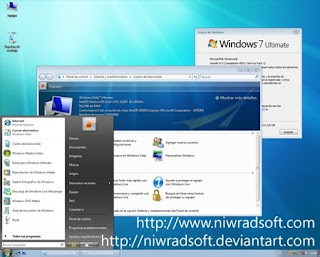
After monotony of default Windows XP/ Windows Theme, it is the time to change yourself and try something new. After windows 7 beta has been released, its time to try the latest Windows Looks and Feels. So just grab the latest Windows 7 Theme (Transformation Pack) which will give a fresh look to your computer.

Seven Remix is a completely free transformation pack which lets you enjoy the look and feel of windows 7 very easily. Seven Remix transformation pack is designed by niwradsoft
Seven Remix transformation pack is made to work on following versions of windows vista, Windows Vista (all editions, SP1), Windows 2008 (all editions, SP1), All Language Versions
Note: This transformation pack is not supported on 64-bit versions of Windows Vista or Windows XP.
Link:- Download Seven Remix Transformation Pack For Windows Vista

Read Users' Comments (0)

React OS – Alternative to Windows

I am using windows operating system for last decade and also sometime install Linux based distributions for testing purposes, this time I’ve found something really amazing to test operating system on my PC, and this amazing thing is React OS. It is Windows NT based open-source operating system, which supports Windows binary (exe) to run in it.reactos_cdcover

React OS is still under heavy development and is in alpha stage of development. The developers itself recommend not to use for daily purposes, till some more improvements are made; but if you are a computer geek and love to try out different OS, then you may give it a try. You can download React OS by various means-

  • Download React OS as Installation CD, Live CD
  • You can also run it virtualized using VMware virtual machine or QMenu
  • You can also get the source code of React OS

You can get to downloads page of React OS at here.

Read Users' Comments (0)

offline browser-HT Track

HTTrack is a free (GPL, libre/free software) and easy-to-use offline browser utility.

It allows you to download a World Wide Web site from the Internet to a local directory, building recursively all directories, getting HTML, images, and other files from the server to your computer. HTTrack arranges the original site's relative link-structure. Simply open a page of the "mirrored" website in your browser, and you can browse the site from link to link, as if you were viewing it online. HTTrack can also update an existing mirrored site, and resume interrupted downloads. HTTrack is fully configurable, and has an integrated help system.

WinHTTrack is the Windows 9x/XP/Vista release of HTTrack, and WebHTTrack the Linux/Unix/BSD release. See thedownload page.Screenshot of Windows GUI

Read Users' Comments (0)

Automatic lyrics display for your favorite track!


MiniLyrics is a fascinating lyrics viewer for synchronizing and displaying lyrics of the currently playing song in Winamp 2.0/3.0, Winamp 5.x, Windows Media Player, itunes, matchbox, Quintessenial Player, foobar2000. RealOne Minilyrics makes your music come alive with streaming lyrics that are timed with the song.

You can follow along with the artist and catch every word,and even sing along like a Karaoke machine. Minilyrics is an application that helps you to view lyrics of your favorite songs. Minilyrics is fully compatible with all major music players, like Winamp, Windows Media Player, etc. As the easiest-to-use Lyrics viewer software, Minilyrics only needs a few steps to install and take you less than 5 mins to have a full version ready for use. Whenever you launch the any of the media players, the software will automatically get started. Minilyrics lets you select your favorite skins, fonts, colors and minimize the viewer window to whatever size that you feel comfortable with. The karaoke mode brings you tremendous joy in learning a song by moving the lyrics word by word.

Some key features:
- Automatic lyrics display for your favorite songs
- Never expired trial version
- Cool skins
- Wild compatibility for 13 players

MiniLyrics supports:
· Winamp
· Windows Media Player
· Foobar2000
· Apple iTunes
· RealPlayer
· Quintessential Player
· Musicmatch Jukebox
· MediaMonkey
· The KMPlayer
· JetAudio
· Yahoo! Music Engine
· J. River Media Center
· J. River Media Jukebox
· XMPlay
· BSPlayer

MiniLyrics 6.6.320
New: Support VLC media Player 1.0.
New: New local hotkey settings.
Improved: Optimized the lyrics display CPU cost.
Improved: Lyrics editor.
Fixed: Lyrics displaying fade out bug.

Skins:http://www.crintsoft.com/mlskin.htm
Changes:http://www.crintsoft.com/mlwhatsnew.htmhttp://www.minilyrics.com/msg.htm
Home:http://www.crintsoft.com/http://www.minilyrics.com/

Official Download:
http://www.crintsoft.com/download/MiniLyrics.exe


Read Users' Comments (0)

Prevent Cut – Copy – Paste – Delete – Renaming of Files and Folders


If you don’t want others to use your computer, copy data and modify your files and folders, Try Prevent. It is a freeware app which prevents others from copying anything from your computer along with blocking access to cut, copy, paste, rename or delete files and folders.

You can download and install Prevent. You can use your own keyboard shortcuts to stop the application. If you want to activate Prevent, Just start the application and it prevents any unauthorized modifications. You can stop this application to get all the functions to work normally.


Here is the list of functions Prevent can be used for,

  • Prevent Cut – Copy – Paste – Delete – Renaming of Files and Folders

    Stops Cut

  • Stops Paste

  • Stops Copy

  • Stops Delete

  • Stops Copy To

  • Stops Move to

  • Stops Send To

  • Prevents renaming

  • Disables Task Manager’s End Process button.

  • It even prevents you to right click on process name and click on end process. It also grays out the context menu items, disable Ctrl+C, Ctrl+X and Ctrl+V and/or stops the process.

Get this handy application from this link.

Read Users' Comments (0)

Flash Cookies? What are Flash Cookies?

Flash cookies are a new way of tracing your movement and storing a lot more information about you than with normal cookies. One major disadvantage of flash cookies is that you can’t locate them in your browser. They are not shown in the list of cookies that you can see when you take a look at the cookies that are currently saved in your web browser. Normal HTTP cookies can’t save more than 4 Kilobyte of data while Flash cookies can save up to 100 Kilobyte. If you want to try out how they work you could do the following.

Go to Youtube, increase or decrease the volume of the videos and delete all cookies afterwards. You will notice that the volume level is still at the same level when you close your browser and open it again. This is done with so called Local Shared Objects, better known as Flash cookies. The main question is of course how a computer can be checked for Flash cookies and how it would be possible to delete those cookies again.

Turns out that web site operators can use Flash applets embedded on their site to write information into a preference file stored on the computer that visits the site. One thing this preference file can be used for is recreating a browser cookie that may have been deleted, or to store other tracking information. The idea of using Flash as a means of hiding a tracking cookie on a machine bothers me because it is insidious. There are clear interfaces built into web browsers for managing regular cookies, and users can delete or reject them as they choose. Flash Cookies are hidden in user libraries and preference files, and to manage them you have to burrow into Adobe’s support site to find the applet that will manage the privacy settings for the Flash Player installed on your computer. Did you catch that? To manage the privacy settings of a program installed on your computer, you have to go to an external web site. That bothers me on a fundamental level. I should be able manage the software on my computer using tools on my computer, without having to go to a vendor’s web site.


Because Flash Cookies use preferences written elsewhere on the computer, they aren’t tied to a single browser. I visited the Adobe page containing my Flash privacy settings with 2 different browsers and saw the same list of sites that are storing information on my machine. So, in that way, Flash Cookies are even better than regular browser cookies for advertising use, because they can affect every browser you have installed. A Flash Cookie could identify you to an advertiser, even if you’ve never visited the site with this specific browser before!

go to settings manager  
                                           to change settings 

Read Users' Comments (0)

HOW TO MAKE GREAT PASSWORDS


  1. Think of a memorable, eight or nine-word sentence like “Fred is a bad ninja but has 3 nunchucks”.
  2. Take the first word of every sentence to turn it into a password. Result: “Fiabnbh3n”
  3. Test your password using Microsoft Password Checker
That’s it. You’re done! You’ll find that this method results in remarkably easy to remember and strong passwords.

Read Users' Comments (0)

Prevent keyloggers from grabbing your passwords(VESIK METHOD)


Vesik method revised

  1. Suppose your password is Jk5pGHmY9
  2. Type three random characters into the password field (say, Wv5)
  3. With your mouse, highlight those random characters and type three more random characters right over them (say, aUJ). Repeat this step a few times (the more you repeat, the harder it is for someone looking at a log of your keystrokes to figure out your true password)
  4. Highlight the last portion of gibberish you typed and input a segment of your true password (say, pGH)
  5. Place your cursor to the left or right of the correct portion of your password and repeat steps 2 to 4
  6. Once your whole password is contained within the password field, click the “Submit” or “Log in” button
This is effective because a keylogger would register something similar to the following set of keystrokes:
click Wv5 click d3i click M%f click pGH click Opl click 37s click Jk5 click rF9 click 1N8 click mY9 click
Your true password is contained in those keystrokes, but neither a computer program nor a human looking at them would know which strokes are legitimate and which aren’t. Most thieves would move on to an easier target if they ran into a mess like this one. However, if the thief was persistent, he could probably find your true password by trial and error. But his chances for each attempt are low, at around 1 in 10 million.

Read Users' Comments (0)